Troubleshooting Steps for Survey App (PWA)
These steps needs to be followed when the release happens.
1. Verify App Version:
- After logging in, ensure that you are using the latest version of the app (version 1.2.62).
2. Update App Version:
- If the latest version is not visible, please follow these steps:
> Ensure all your surveys are synced before uninstalling the PWA app.
> Uninstall the PWA App
> When uninstalling do select the checkbox as shown on the below screen and then click on remove.
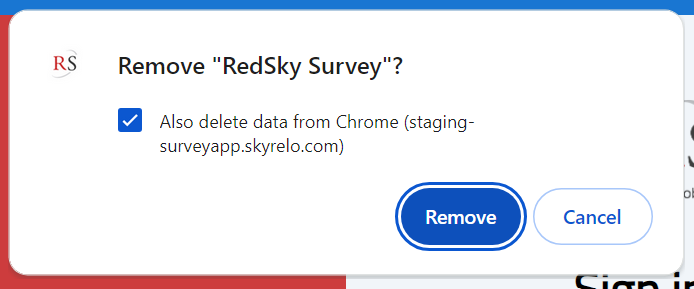
> Reinstall and Verify: Log in to the app again and check the version to confirm that you have the latest update.
3. Allow Background Migration:
- For the initial use, keep the PWA app online for 20 minutes to ensure that all background migration processes complete successfully.
Was this article helpful?
That’s Great!
Thank you for your feedback
Sorry! We couldn't be helpful
Thank you for your feedback
Feedback sent
We appreciate your effort and will try to fix the article