Overview :
This policy is intended to establish guidelines for effectively creating, maintaining, and protecting passwords.
Purpose :
The purpose of this policy is to establish a standard for creation of strong passwords, and the protection of those passwords.
Scope :
The scope of this policy includes the Corporate, Account, Driver, and Partner User types.
How to impose the Password Policy :
Tick the 'Password Policy' checkbox for Corporate users.
Tick the 'Password Policy For External Users' checkbox for Account, Partner, Driver.
System Default >> Operations
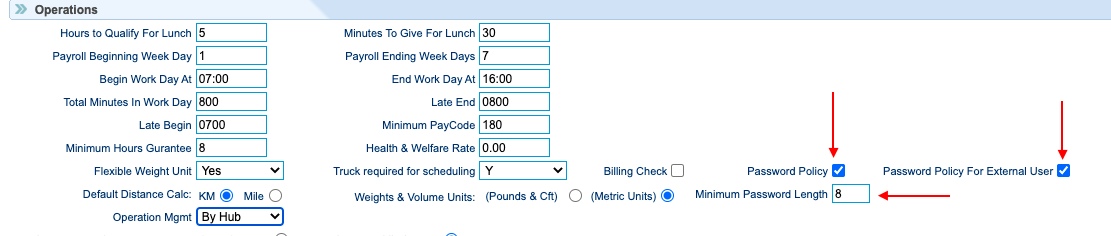
Password length can be set by providing the 'Minimum Password Length' which can be in range of 8 to 15.
Password Policy :
- Must be of at least the minimum length set in system default.
- Have at least one capital letter (A-Z)
- Have at least on symbol out of +/*<>-/?!@#$()
- Max password length is 16 chara
General guidelines :
Weak passwords have the following characteristics which must be avoided:
- The password contains less than eight characters
- The password is a common usage word such as:
- Names of family, pets, friends, co-workers, fantasy characters, etc.
- Computer terms and names, commands, sites, companies, hardware, software.
- Birthdays and other personal information such as addresses and phone numbers.
- Word or number patterns like aaabbb, qwerty, zyxwvuts, 123321, etc.
- Any of the above spelled backwards.
- Any of the above preceded or followed by a digit (e.g., secret1, 1secret)
Strong passwords have the following characteristics which will be followed regardless of system imposed restrictions:
- Are at least eight alphanumeric characters long.
- Are not words in any language, slang, dialect, jargon, etc.
- Contain both upper and lower case characters (e.g., a-z, A-Z)
- Have digits and punctuation characters as well as letters e.g., 0-9, +/*<>-/?!@#$()
- Are not based on personal information, names of family, etc.
Password protection :
- Passwords must not be shared with anyone (including coworkers and supervisors), and must not be revealed or sent electronically.
- Passwords shall not be written down or physically stored anywhere in the office.
- When configuring password “hints,” do not hint at the format of your password (e.g., “zip + middle name”)
- User IDs and passwords must not be stored in an unencrypted format.
- User IDs and passwords must not be scripted to enable automatic login.
Account lockout :
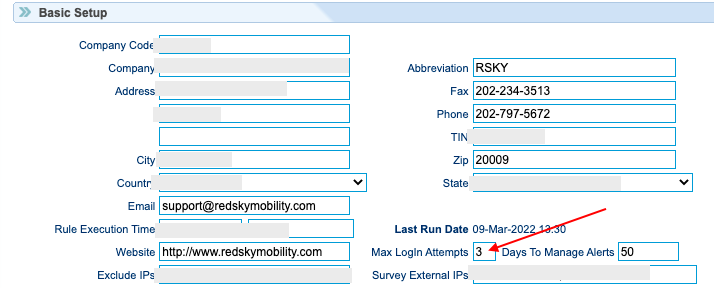
In order to limit attempts at guessing passwords or compromising accounts, an account lockout policy is in effect based on the value of 'Max Login Attempts'.
System Default >> Basic Setup
Was this article helpful?
That’s Great!
Thank you for your feedback
Sorry! We couldn't be helpful
Thank you for your feedback
Feedback sent
We appreciate your effort and will try to fix the article